This article will be about trying to think about vectors in a new way in order to make it easier to visualize and understand how to use vectors and in what situations you use them.
Foundation
First in order to understand vectors we need to start thinking about numbers in a different way. Normally how most people learn to think of numbers is as quantities, describing a certain number of things. This isn’t incorrect however in order to think about operations and transformations in numbers in a way that prepares us for vectors we need to start thinking of numbers in terms of grids. The most simple representation of a grid for a number is a number line, representing numbers growing and shrinking as they go left and right on a number line.
Try to think of it as it’s relation to the origin, like this example.
1D Operations
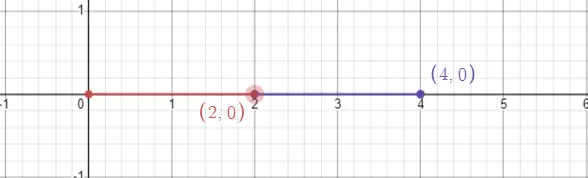
Now that you’re thinking as numbers as 1d vectors let’s see how adding them or subtracting them might look to get you in the correct frame of mind. This example shows how adding 2 + 2 = 4
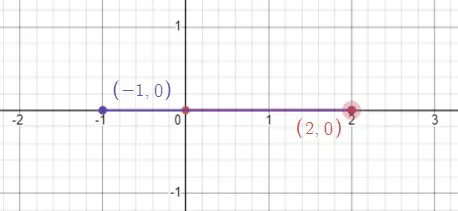
This example shows how 2 - 3 = -1. (the same as 2 + -3 = -1)
multiplication
Adding A New Dimension
Now we’re working up to a new dimension and we’ll start using the y Axis, however you’ll come to find it works exactly the same way. Let’s go over some examples. First things first let’s show the first example again but in the new dimension to orient ourselves.
Notice how our number describes a position in the grid as well as the line from 0, 0 to the point. There is no difference between the two only how we think about it. One final example to nail the point home. Notice how this point is also described as the offset on the X axis and an offset on the Y axis.
Operations
Now we’re going to start manipulating our vectors with math, before we continue let’s quickly go over the difference between a scalar and a vector.
A vector is a measure with a magnitude, and direction. That means it has a length (magnitude) and a direction (the axis the magnitude travels down, you can think of it like rotation or the “way” the line goes from the origin).
A scalar is a measure with just a magnitude, meaning it’s only a measure of quantity, which if you’ve been paying attention is exactly what a 1d vector is. Technically the fact that its negative or positive does not describe its direction because no matter what it’s on the same axis.
Now we’ll go over some simple operations we perform on 2d vectors with both scalars and vectors.
Vector + Vector
Adding two vectors is one of the simplest operations to perform. The math works like this:
(x1, y1) + (x2, y2) = (x1 + x2, y1 + y2) (x = 1, y = 2) + (x = 3, y = 4) = (x = 1 + 3, y = 2 + 4) = (x = 4, y = 6)
Vectors are offsets from the origin just as numbers are, but when you add them you change that new origin to the end of the other vector.
Vector - Vector
This is very similar to addition, except it flips the vector 180 degrees.
(x = 1, y = 2) + (x = 3, y = 4) = (x = 1 - 3, y = 2 - 4) = (x = -2, y = -2)
Vector * Scalar
Vector times a scalar multiplies each number by the scalar like so:
(x = 1, y = 2) * 2 = (x = 1 * 2, y = 2 * 2) = (x = 2, y = 4)
This isn’t quite useful on its own but combined with normalization it can be very powerful. We’ll cover that soon.
I won’t be doing division however division is just the inverse of multiplication anyways so you should be able to extrapolate it.
Magnitude
Let’s dive a bit deeper on magnitude. It was stated before that vectors have magnitude and direction and magnitude is the “length” of the vector. You probably know what this means conceptually but let’s talk about some ways it can be problematic and how you get it. When written in mathematics the magnitude of a vector is commonly written with | | bars. For example, magnitude of v = | v | or || v ||.
First, how to get it. Getting the length of a vector is easy, all we need is our good pal Pythagoras a^2 + b^2 = c^2 and we can reason that the magnitude is just sqrt(x^2 + y^2).
Now the problem with doing this in code is that it can be very expensive to perform square root operations for a computer. Everytime in Roblox when we use .Magnitude to get the length of a vector we’re performing this square root operation. Checking the distance between objects usually isn’t that bad but if you’re doing it many many times really fast it can be a drain on resources. Have no fear there’s a solution that we’ll get to later after we’ve learned about Dot products.
Until then here’s a video of the triangle that forms so you can better see the relationship with Pythagoras.
Useful Operation: Vector - Vector
Okay now we’re finally getting to some useful stuff after laying all this groundwork. One of the most simple operations performed on vectors to vectors is subtraction. In normal 1d mathematics subtraction will give us the “difference” between two numbers, with vectors it does the same thing. Let’s go through an example to understand better how this can be useful.
Imagine you have two objects in your game world and each one has a position. As we’ve learned positions are just Vectors that store numbers describing where they are in the world.
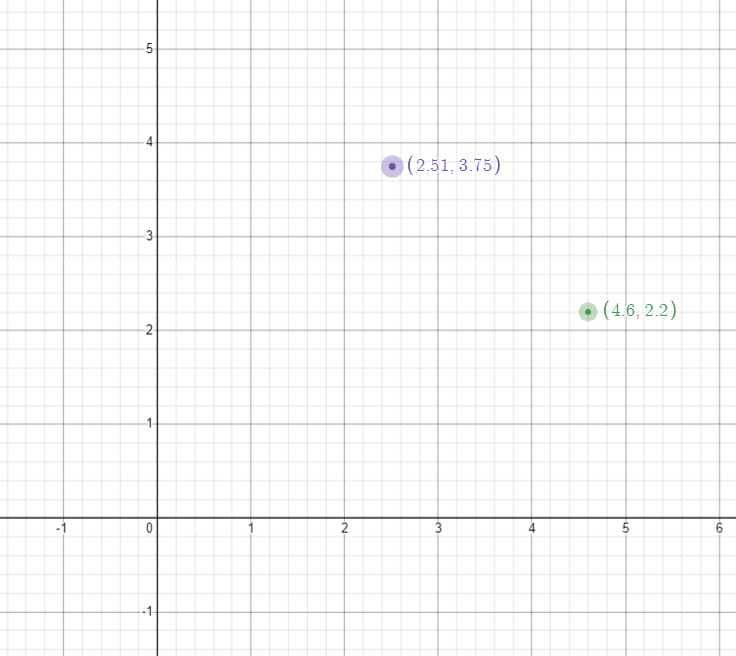
What do we get when we subtract these two positions from each other (purple - green)? We get some strange point way over here, but remember what I said before, subtraction describes the difference between two numbers and it describes the difference between two vectors and has the same magnitude as the distance between each. That point purple - green is the offset from zero that 0,0 is from black. We can prove that too. If we take black and add it to green we will get purple exactly!
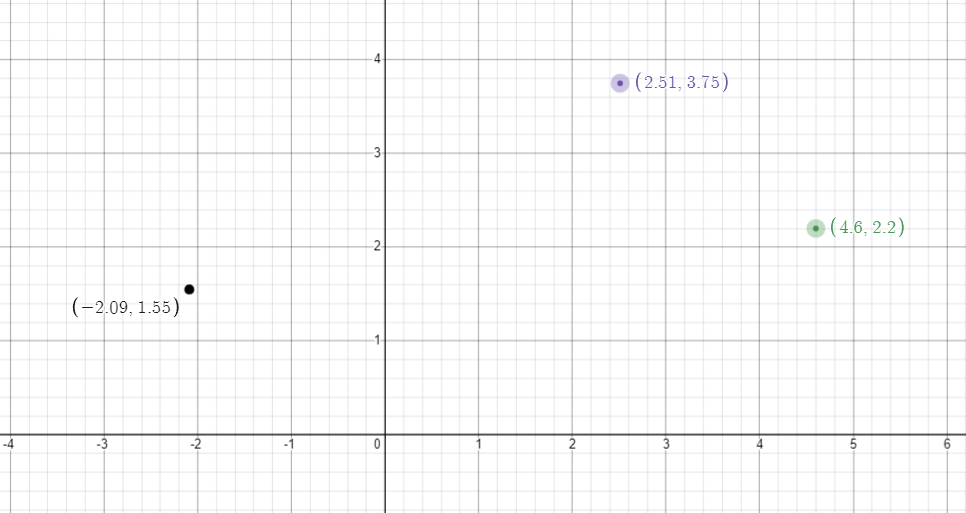
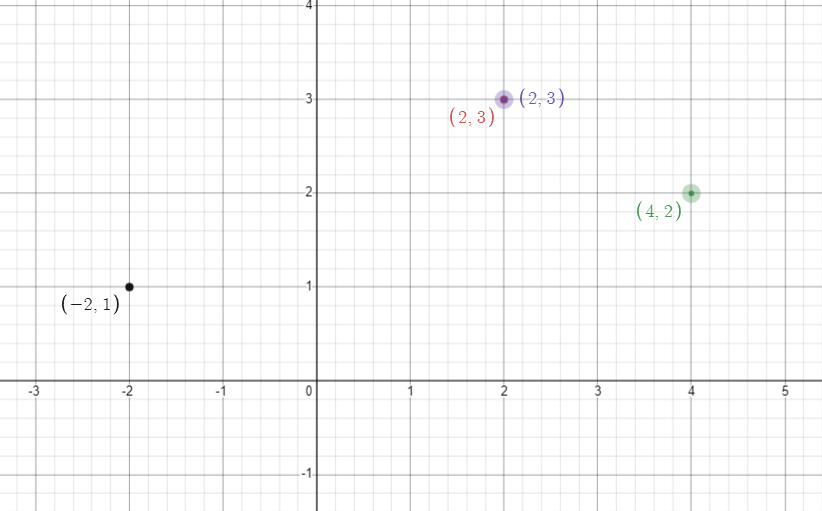
Taking this even further if we want the midpoint between purple and green all we have to do is divide black by 2 and add it back to green.
Understanding how these different transformations can get you exactly what you need to solve your problem will make you capable of coming up with your own ideas and solutions to very difficult and complex tasks.
The Point: vector a - vector b = difference of b to a, vector pointing direction b is to a, and has magnitude of the distance between b to a.
Normalization
Normalization is the act of making your vectors magnitude exactly 1 unit long. This is useful because any number multiplied by 1 is itself. Let’s go over a thought experiment in order to answer why this can be useful to you.
Imagine you are trying to code a gun and you’re going to use a hitscan raycast technique. That means when you click the bullet will travel instantly in the direction your mouse is pointing. This also means you need to get a vector with the magnitude long enough to detect your target. We can use the mouse.Hit position as the place our mouse is in the game world and we have a reference to the gun position or the head position. (checking line of sight) What we can do to get a vector that’s in the direction of the head to the mouse is (mouse.Hit.Position - head.Position). This should give us a vector the difference of those two positions as discussed in the previous section. However the mouse ray is going to stop right BEFORE our target meaning we can’t detect hits this way. One thing we COULD do is just increase our ray a little bit further by multiplying it by 1.2 or even double it with * 2. Right? However this isn’t always ideal.
What we really want is a way to control exactly how far our gun can hit. What we can do is take the Unit vector (normalized vector) of the difference between each vector and multiply it by whatever number we want. The reason we call it a Unit vector is because it’s a basic unit of all other vectors because 1 multiplied by anything can make it whatever length we want!
(mouse.Hit.Position - head.Position).Unit * 300 is a common way to get a ray direction.
For fun the math behind a unit vector is just each number in the vector divided by the magnitude of the vector.
unit = v / | v |
The Point: Normalizing a vector can get you a vector with the same direction but change the magnitude to whatever you want (or simplify operations).
Dot Product - Vector * Vector
Finally let’s talk about Dot products and Cross products. When multiplying vectors together we perform a Dot operation. That means we’re NOT doing:
NOT DOING
a = (x = 1, y = 2)
b = (x = 3, y = 4)
a * b ~= (a.x * b.x, a.y * b.y)
Instead the math gives a scalar as a result.
a * b = a.x * b.x + a.y * b.y
      = |a| * |b| * cos(theta)
This means a dot product is equivalent to the length of a times the length of b times the cos of theta. Theta being the angle between each vector. Let’s talk about how this can be useful a bit and then show some examples.
Uses of Dot Products
- Finding the angle between two vectors.
- Finding the squared magnitude of one vector.
- Finding the projection of one vector onto another.
Finding The Angle Between Two Vectors
The most simple use case for handling vectors is finding the cos of the angle between the two vectors. Which you can use to get the actual angle between the two vectors. Let’s go over some examples to demonstrate how it works.
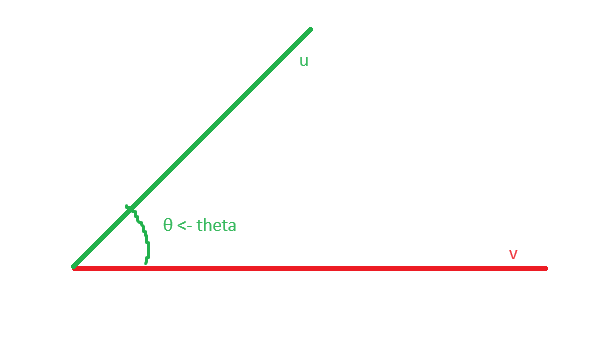
In this case the u:Dot(v) will result in ||u|| * ||v|| * cos( θ ). We can get the actual angle from that by dividing by |u| * |v| and taking the acos of the result. |u| and |v| being the magnitude of each vector. If we want to simplify our calculation we can normalize u and v which makes each length exactly 1. That would make the equation 1 * 1 * cos(θ) and anything by 1 is itself so it simplifies down to just cos(θ). If you know trigonometry a little bit you may already see how this can be useful already. This will give you the angle between each vector:
local a = math.acos(u.Unit:Dot(v.Unit))
That being said acos can be an expensive calculation just as sqrt can be. Sometimes we don’t even need to know the actual angle we just need to compare it with a number. The way cos works is it’s a number from 1 to -1 with 1 being angle 0 degrees and -1 being angle 180 degrees. That means if, for example, we wanted to know if the angle was behind a player and we knew the vector that pointed forward from where they were facing (hint hint CFrame.LookVector) we can tell if the cos between pointing forward and pointing to the monster or enemy or whatever is greater than 0 then they’re in front of the player.
That being said acos can be an expensive calculation just as sqrt can be. Sometimes we don’t even need to know the actual angle we just need to compare it with a number. The way cos works is it’s a number from 1 to -1 with 1 being angle 0 degrees and -1 being angle 180 degrees. That means if, for example, we wanted to know if the angle was behind a player and we knew the vector that pointed forward from where they were facing (hint hint CFrame.LookVector) we can tell if the cos between pointing forward and pointing to the monster or enemy or whatever is greater than 0 then they’re in front of the player.
ex:
local v = part.CFrame.LookVector -- vector looking straight ahead
local u = (enemy.Position - part.CFrame.Position).Unit -- vector from part pointing towards enemy
v:Dot(u) > 0 -- is behind?
-- equivalent to: cos(angle between v and u) > 0
It’s best to avoid expensive calculations when you can.
Finding The Squared Magnitude
Remember before we talked about how the Pythagorean theorem gives us a square root formula to find the length of a vector and we can skip it in certain circumstances using Dot products? Now I’ll tell you how.
Squared Magnitude is only useful when you need to compare distance if you only need to know if a distance is greater or smaller than another distance (or equivalent) then this could save you a lot of computation and speed. Now for the math.
a^2 + b^2 = c^2 -- pythagoras
sqrt(a^2 + b^2) = c
sqrt(a * a + b * b) = c

u:Dot(v) = u.x * v.x + u.y * v.y -- normal dot product
v:Dot(v) = v.x * v.x + v.y * v.y

sqrt(v:Dot(v)) = sqrt(a * a + b * b) = c

-- a dot operation on the same vector will give you the "squared" magnitude of the vector. Every operation in Pythagoras except for the square root. Which means if you compare it with a squared number you can tell if it's larger or smaller than it.
v:Dot(v) > 5^2
-- this tells us if magnitude of v is larger than 5 without using any square root operations.
Finding the projection of one vector onto another.
Projection onto a plane can be useful in a lot of circumstances although you’ll need to be creative to use it. It can be especially useful in a 3d environment. Anyways, continuing on let’s make it clear exactly what “projecting” means. If we have vector u and we want to know how far along it is on the axis that vector v travels down. Basically what this means is we’re trying to constrain our vector v to a length that matches exactly with the end of vector u. Here’s a picture to describe that.
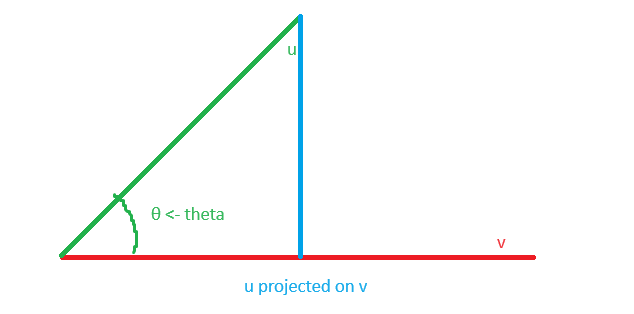
One thing to mention is this does not matter the size of v or even if v is rotated 180 degrees or not. All we really care about is the “axis” or part of an infinitely long invisible line that u will fall onto. To sum up the math what we’re trying to do is find out the ratio of size u to size v in order to scale u correctly. The formula is this:
(v * u / u * u) * u
--- aka
( v:Dot( u ) / u:Dot( u ) ):Dot( u )
Basically we’re taking the scales cos of each side and dividing it by the squared magnitude of u. Which gives us a ratio for how long v and u is to the length of u, then we multiply u by that number to scale it to exactly the right magnitude/length.
Cross Products
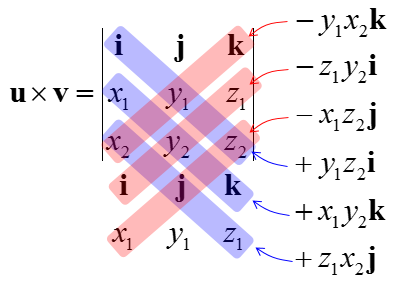
I’m going to refrain from going deep into the math on this one and we’ll also be switching to 3d! The notation for this is an x not to be confused with multiplication.
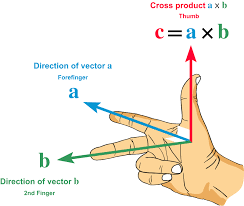
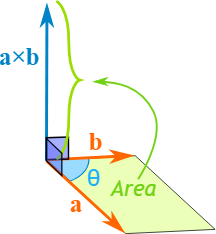
The cross product between one 3d vector and another 3d vector is a vector that is:
- 90 degrees/perpendicular to both vectors.
- The magnitude of the area of the shape/parallelogram both vectors make. Due to this being mostly in 3d space I will use images found online to demonstrate this.
Here is the math for those of you who are brave, don’t think you NEED to know this though: